
Overview
The FTP / SFTP / FTPS connector indexes documents stored on remote file servers. Use it to bring files from legacy or internal file shares into UtopikAI search. Supported protocols:SFTP is the recommended secure option. SFTP credentials require host key verification before they can be saved.
How it works
The connector connects to your remote server, reads files from the paths you configure, and indexes supported document types for search. After the initial sync, UtopikAI re-fetches content on the connector’s refresh schedule to keep answers up to date.Setting up
Add the connector
- Open Admin → Connectors → Add Connector.
- Under Storage, select FTP / SFTP / FTPS.
- Create or select a credential (see below).
- Configure the remote paths or folders to index.
- Save the connector to start indexing.
Create a credential
Before indexing, create a credential for your file server:- In the connector setup flow, open Create FTP / SFTP / FTPS Credential.
- Choose a Protocol — SFTP, FTPS, or FTP.
- Enter the server Host (for example
example.com) and Port (defaults to22for SFTP). - Provide a Credential name (for example
Production SFTP) and Username. - Complete any protocol-specific steps below, then click Save Credential.
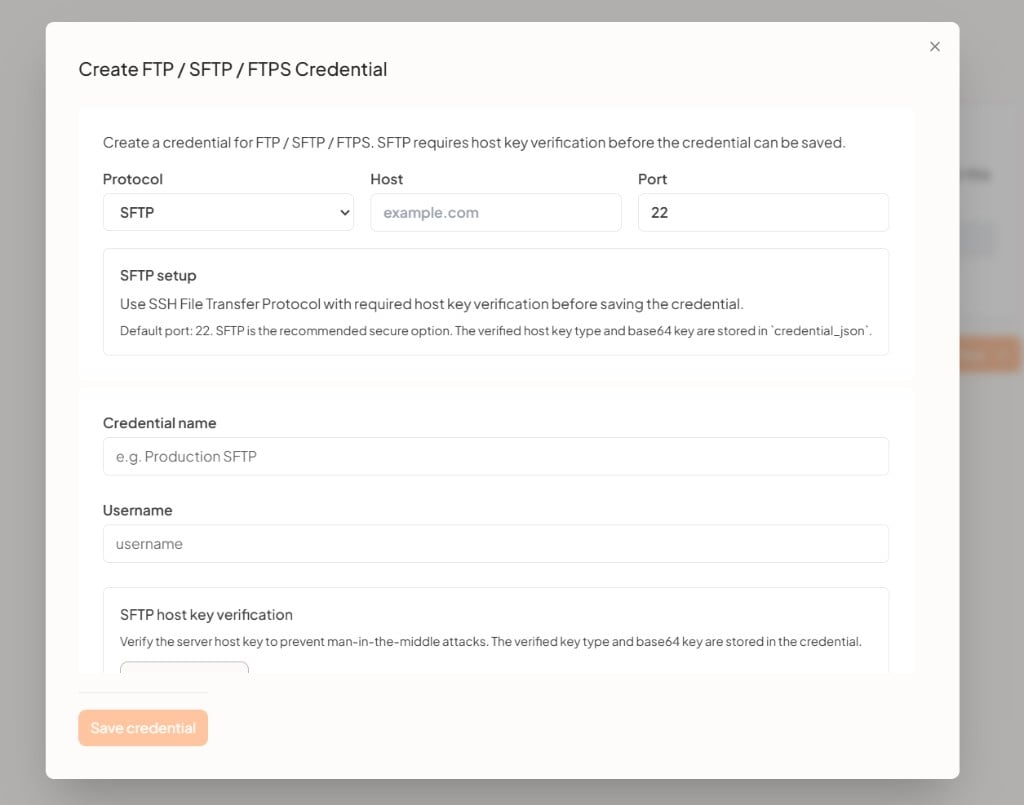
SFTP host key verification
When using SFTP, you must verify the server’s host key before the credential can be saved. This prevents man-in-the-middle attacks.- Enter the host, port, and username.
- Run host key verification against the server.
- Confirm the displayed key matches your server’s known host key.
- The verified key type and base64-encoded key are stored in the credential configuration.
FTPS and FTP
- FTPS — Uses FTP over TLS/SSL. Provide the host, port (typically
21), username, and password when prompted. - FTP — Standard unencrypted FTP. Use only on trusted networks; prefer SFTP or FTPS for production environments.
Indexing
- Select the credential you created.
- Specify the remote paths or directories to index (for example
/data/docsor/shared/knowledge). - Optionally narrow indexing with include/exclude rules if your deployment supports them.
- Save the connector.
Supported file types
The connector indexes common document formats including PDF, DOC, DOCX, TXT, MD, CSV, and other text-based files supported by your UtopikAI deployment. Binary or unsupported formats may be ignored during indexing.Troubleshooting
For enterprise setup help, contact support@utopikai.com.