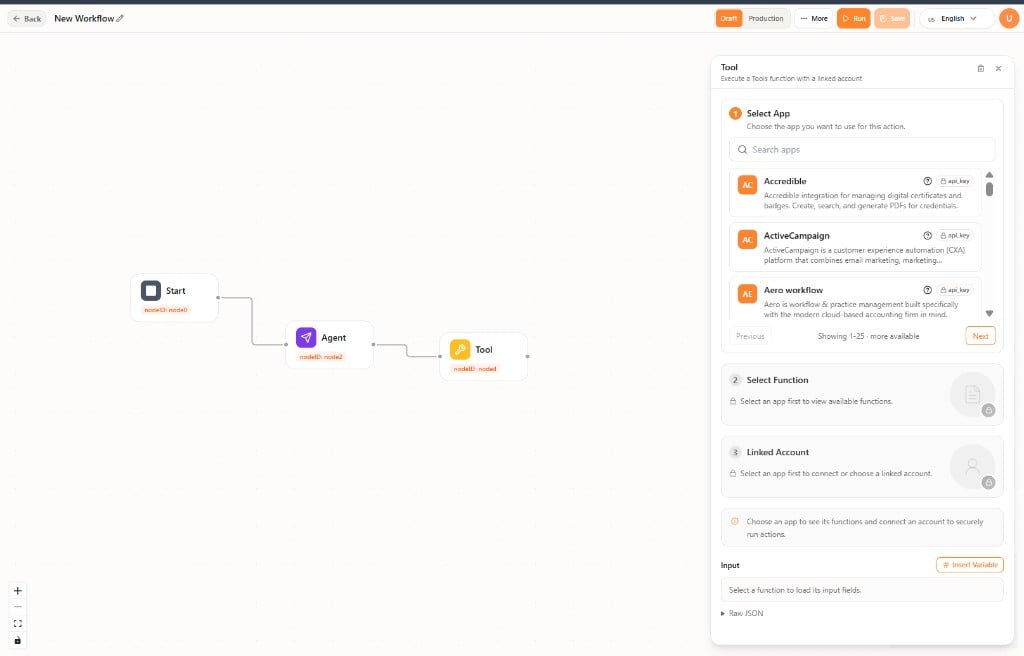
The Tool node runs a function from a connected app with a linked account. Add Tool from Integrations in the node library. Tool node configuration

Configure the Tool node

Select the node to open the Tool panel. Complete the steps in order:
  1. Select App — Search the app catalog and pick an app.
  2. Select Function — Choose the action to run. This step unlocks after you pick an app.
  3. Linked Account — Connect or choose the account the step should use.
Then fill in the function inputs. Use Insert Variable to pass values from earlier steps, or expand Raw JSON when you need the payload as JSON. Manage which apps are available in AdminTools. See Tools Overview.