> ## Documentation Index
> Fetch the complete documentation index at: https://docs.utopikai.com/llms.txt
> Use this file to discover all available pages before exploring further.
# Tasks Overview
> Run assistant or agent work on a schedule or on demand
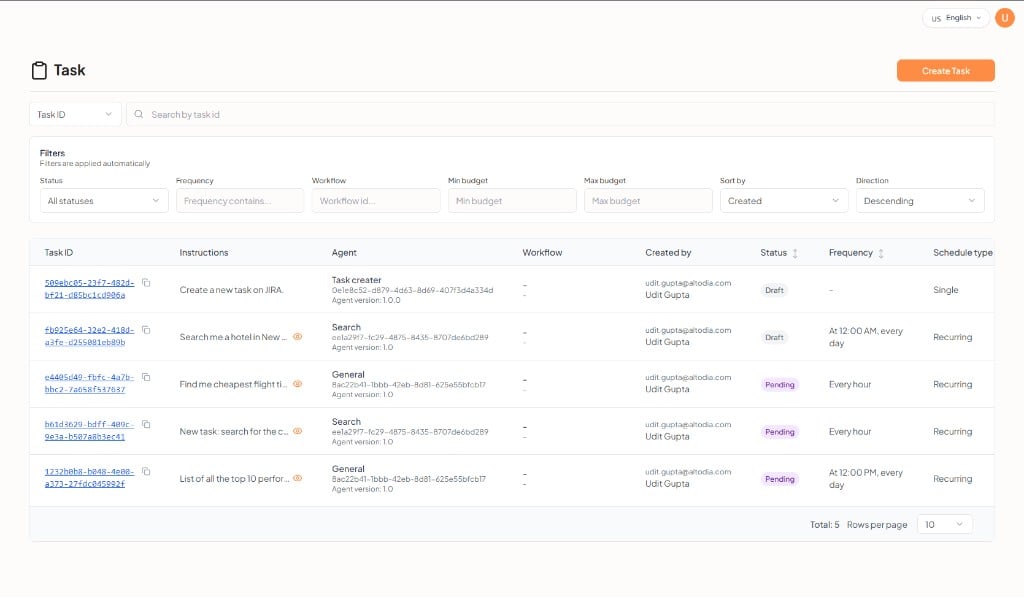
**Tasks** run **assistant** or **agent** work on a schedule or on demand, without a full [workflow](/workflows/overview). Use tasks for recurring jobs such as daily summaries. Use workflows when the job needs multiple connected steps — a workflow can also run on a schedule from its [Start trigger](/workflows/editor#start-trigger-type).
Each task is attached to one assistant or one agent. **Agents** usually carry unattended runs. **Assistants** can also have tasks attached during setup.
## Task Management
Administrators manage tasks from **Admin** → **Task Management**:
| Area | What it is |
| ------------------ | ------------------------------------------------------------------------------------ |
| **Task Templates** | Reusable definitions (instructions, assigned assistant or agent, schedule, settings) |
| **Task** | A live instance you run or schedule |
| **Task Results** | History, status, and output for each run |
## Create a task from an assistant or agent
You can also add a task in step 7 of [Creating Assistants](/guides/assistants#step-7-tasks) or [Creating Agents](/guides/agents#step-7-tasks).
Search existing tasks by **Task ID**, or click **+ Add Task**.
 If none exist, the empty state is *No tasks for this assistant yet* or *No tasks for this agent yet.*
## New task form
Click **+ Add Task**. Fill in the form, then **Create Task**.
If none exist, the empty state is *No tasks for this assistant yet* or *No tasks for this agent yet.*
## New task form
Click **+ Add Task**. Fill in the form, then **Create Task**.
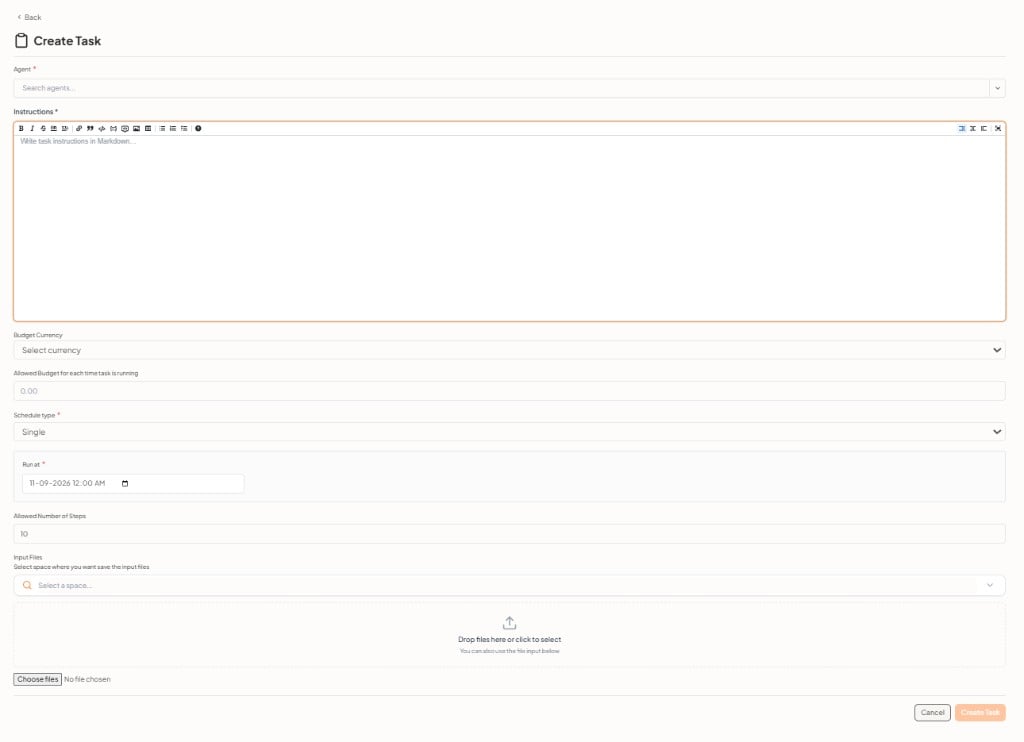 The **Agent** field is the assistant or agent you are editing (name, version, and status). It does not create a separate entity. When you add a task while editing an assistant, that field is the assistant. When you add a task while editing an agent, it is that agent.
| Field | Required | What it does |
| ------------------------------------------------ | -------- | ----------------------------------------------------------- |
| **Agent** | Yes | The assistant or agent you are editing |
| **Instructions** | Yes | Task instructions in Markdown |
| **Budget Currency** | No | Currency for the run budget |
| **Allowed Budget for each time task is running** | No | Spend cap per run |
| **Schedule type** | Yes | For example **Single** |
| **Run at** | Yes | Date and time for a single run |
| **Allowed Number of Steps** | No | Maximum steps per run (default `10`) |
| **Input Files** | No | Space to save files, plus drag-and-drop or **Choose files** |
The **Agent** field is the assistant or agent you are editing (name, version, and status). It does not create a separate entity. When you add a task while editing an assistant, that field is the assistant. When you add a task while editing an agent, it is that agent.
| Field | Required | What it does |
| ------------------------------------------------ | -------- | ----------------------------------------------------------- |
| **Agent** | Yes | The assistant or agent you are editing |
| **Instructions** | Yes | Task instructions in Markdown |
| **Budget Currency** | No | Currency for the run budget |
| **Allowed Budget for each time task is running** | No | Spend cap per run |
| **Schedule type** | Yes | For example **Single** |
| **Run at** | Yes | Date and time for a single run |
| **Allowed Number of Steps** | No | Maximum steps per run (default `10`) |
| **Input Files** | No | Space to save files, plus drag-and-drop or **Choose files** |
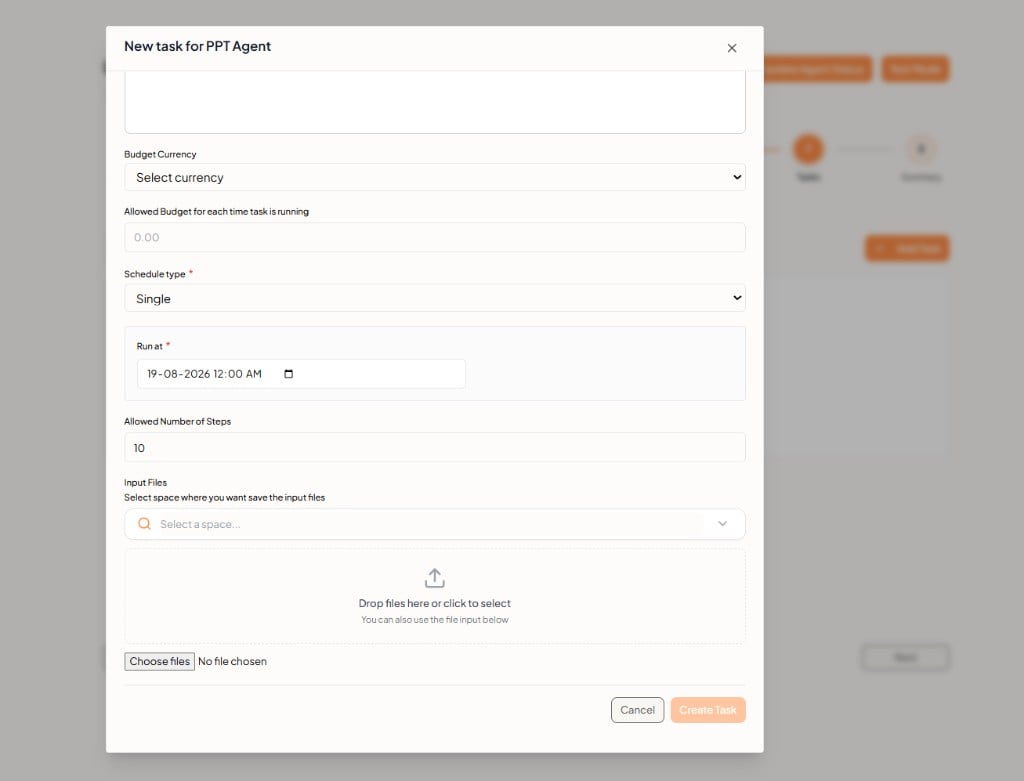 Click **Cancel** to close without adding a task.
## Related documentation
* [Creating Assistants](/guides/assistants)
* [Creating Agents](/guides/agents)
* [Workflows Overview](/workflows/overview)
* [Introduction](/introduction)
Click **Cancel** to close without adding a task.
## Related documentation
* [Creating Assistants](/guides/assistants)
* [Creating Agents](/guides/agents)
* [Workflows Overview](/workflows/overview)
* [Introduction](/introduction)